Calculated NOTAM Elements: Calculated Obstacles and Threshold Based Geometry
6/18/2026
Some NOTAMs give coordinates. Some do not.
They describe a place relative to something else: a runway threshold, a runway end, or the airport. That is enough for a human to understand the sentence. It is not enough for a map unless the system can calculate the point.
Notamify uses calculated NOTAM elements for these cases.
Three groups
Notamify calculates NOTAM map geometry in three main ways:
- Compose elements: complex instructions built from coordinates, lines, arcs, borders, and area-building rules. We covered this separately in Compose Map Elements.
- Runway-based elements: points or segments calculated from runway geometry, runway ends, or runway thresholds. This includes threshold based obstacle positions.
- Airport-based elements: points or areas calculated from the airport reference when the NOTAM gives an airport-relative instruction.
This post is about runway-based and airport-based elements.
Indirect references
This Bahrain NOTAM does not publish the crane coordinates:
OBST CRANE WILL BE ERECTED AT HEIGHT 50M, POSITIONS AT APPROX DIST
353M MAG BRG 72 DEG FM RWY 30R THR.
It gives three useful facts:
- distance:
353M - bearing:
72 DEG, magnetic - reference:
RWY 30R THR
The OBBI example in Notamify places the crane near runway 30R threshold.
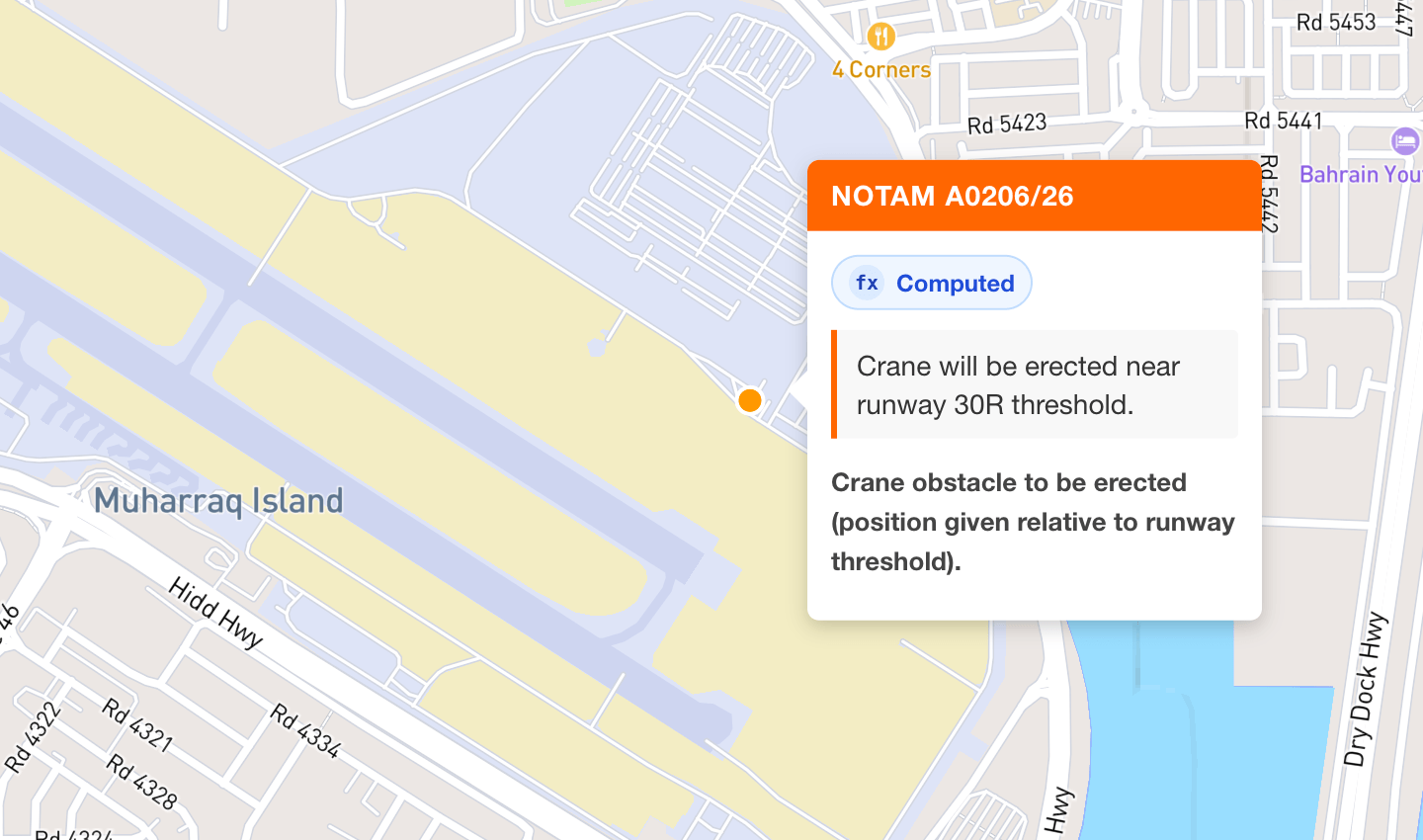
Runway-based calculated elements
Runway-based calculation starts by choosing the anchor. We separate two anchors:
- Runway-end based: the reference is the end of the named runway direction.
- Threshold-based: the reference is the named runway threshold.
A runway end and a threshold can be different points. A displaced threshold is the obvious case. So RWY 30R THR must not be treated as just "somewhere at the end of runway 30R."
The OBBI crane is threshold-based:
- Resolve runway
30R. - Use the runway 30R threshold as the anchor.
- Read
353M. - Read
72 DEG MAG. - Convert the magnetic bearing using NOAA magnetic variation models.
- Project the point from the threshold.
- Render the obstacle as computed geometry.
The coordinate is derived. It is not guessed.
Magnetic bearings
NOTAMs often use magnetic bearings. Maps use geographic coordinates.
When the NOTAM says MAG BRG, Notamify uses NOAA magnetic variation models for the relevant place and date. Then it converts the magnetic bearing to the true bearing used for plotting.
This matters. A small bearing error can move a point far enough to make the map misleading.
Airport-based calculated elements
Airport-based elements use the airport reference instead of a runway reference.
These appear when the text describes a location relative to the airport and gives no direct coordinates. The calculation can use distance, bearing, radius, shape, and vertical limits when the NOTAM provides them.
The rule is the same: use the reference stated by the NOTAM. Do not replace an airport reference with a runway reference, or a threshold reference with a runway end.
Computed geometry
Calculated elements are normal map elements. They can be points, lines, polygons, or GeoJSON features.
They also carry metadata. When geometry is calculated from NOTAM parameters relative to another object, Notamify marks it as computed geometry. In Notam Globe this appears as the Computed badge.
For API users, the geometry is exposed through interpretation.map_elements, the same place where obstacle points, polygons, lines, altitude limits, and other NOTAM map geometry are represented. The map elements also include calculation references, so calculated obstacles can be traced back to the referenced NOTAM text and the reference object used for the calculation.
Example calculated obstacle output:
{
"notam_id": "2b88eed4-365c-45db-8a6b-cdcef3b1666a",
"processed_at": "2026-06-18T13:59:02.742615+00:00",
"processed_elements": [
{
"area_number": null,
"bottom": null,
"coordinates": [
{
"approximate": true,
"bearing": {
"declination_degrees": 2.89666,
"raw_string": "MAG BRG 72 DEG",
"reference": "magnetic",
"true_bearing_degrees": 74.89666,
"value": 72.0
},
"derived": true,
"distance": {
"distance_nm": 0.19060482099999998,
"raw_string": "353M",
"unit": "M",
"value": 353.0
},
"lat": 26.263499359679127,
"lon": 50.65120387967276,
"raw_string": "Crane obstacle to be erected (position given relative to runway threshold).",
"reference": {
"aerodrome_icao": "OBBI",
"lat": 26.26267222222222,
"lon": 50.64778611111111,
"runway_designator": "30R",
"type": "runway_threshold"
}
}
],
"description": "Crane obstacle to be erected (position given relative to runway threshold).",
"geojson": {
"geometry": {
"coordinates": [
50.65120387967276,
26.263499359679127
],
"type": "Point"
},
"properties": {
"computed": true,
"element_type": "relative_point"
},
"type": "Feature"
},
"top": {
"height": {
"raw_string": "50M",
"reference": "AMSL",
"unit": "M",
"value": 50.0,
"value_ft": 164.0
}
},
"type": "relative_point"
}
]
}
The calculation reference combined with vertical limits gives a clear picture of the element, even when the NOTAM does not provide a direct coordinate.
Read more...
EST EXPIRED and EST EXPIRING: Clearer Estimated NOTAM Labels
6/16/2026
Notamify now shows estimated end-time labels only when they matter: when an EST NOTAM has expired or is within 3 hours of its estimated end.
Aircraft Family Filters in Notamify Alerts
6/14/2026
Notamify Alerts can now target aircraft applicability by catalog family or exact ICAO aircraft designator, keeping family selections as family filters in the saved alert.
NOTAM Alerts for Airline OCC: Airport Monitoring Without Keyword Noise
6/12/2026
How Notamify Alerts help airline OCC teams monitor airport closures, fuel outages, and runway changes with semantic NOTAM interpretation instead of Q-code or keyword rules.
Understanding Notamify's NOTAM Categories: A Comprehensive Guide
6/10/2026
Explore how Notamify uses 48 standardized categories and AI to organize NOTAMs, making them easier to understand and manage for aviation professionals.