

Notamify Profiles: Less Noise in Airport NOTAMs
5/5/2026
Notamify Profiles is now available in preview.
It is our next effort to make flight preparation more operation-aware. Instead of making every operator read the same airport NOTAM list in the same order, Notamify Profiles lets you choose the operational context that matters: commercial airline IFR, alternate planning, business jet IFR, GA fixed-wing VFR, helicopter HEMS, or your own aircraft-based profile.

Why profiles
NOTAMs are rarely equally relevant to every operation. A fuel limitation for non-scheduled operators, a helicopter-only closure, a VFR restriction, or an aircraft-code limitation should not carry the same weight for every flight.
Profiles reduce that noise by letting the app compare NOTAM context with the operation you are preparing. You can leave the list unchanged, highlight likely matches, or deprioritise NOTAMs that do not match the selected profile.
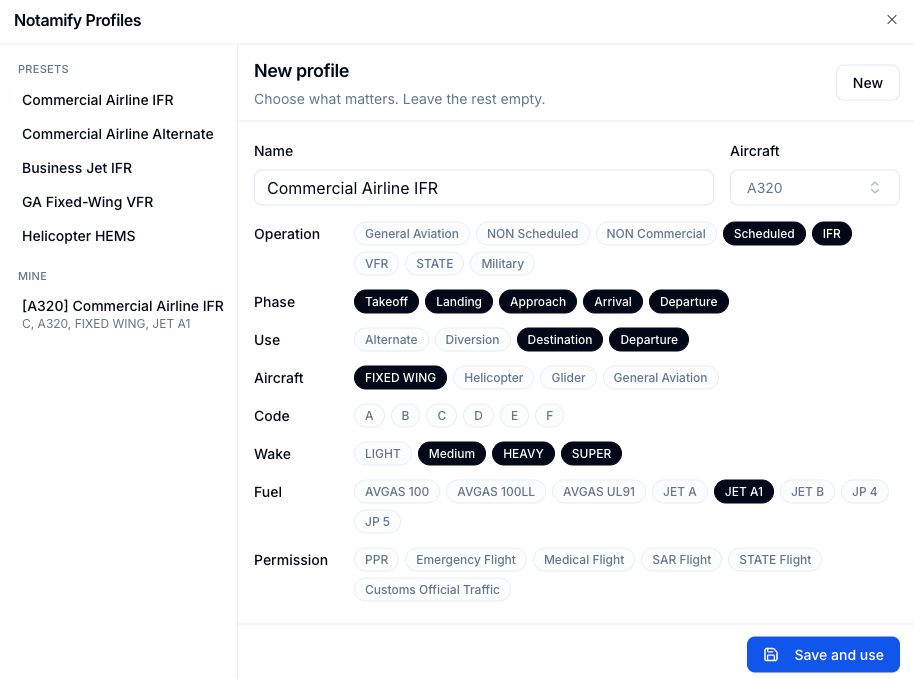
You can use one of the built-in presets or create your own profile. Custom profiles can start from a preset and add aircraft context where it helps with restrictions that apply only to some operations.
This is built on the recent launch of Affected Elements V2. Profiles are the user-facing result: they help turn dense airport NOTAM lists into a more operation-aware review flow.
Saved to your account
Once you choose a profile, Notamify can keep that preference on your account. Airport pages can open with the same profile and behavior you selected: show all NOTAMs, highlight matching NOTAMs, or deprioritise NOTAMs that do not match.

The account setting is there for operators who want a consistent default across devices. You can still change the profile directly from an airport page when a specific flight needs a different view.
Preview note
Not every NOTAM contains enough context for exact applicability filtering yet. Profiles are designed to minimize less relevant NOTAMs, not to replace operational review. During preview, we will keep improving the experience as more operators use it in real workflows.
The direction is clear: flight preparation should move from manual text scanning toward operation-aware automation.
Try it now
Notamify Profiles is available in preview for Notamify Pro users. Activate Notamify Pro to try it on airport NOTAM pages.

Read more...
Track Starship NOTAMs and Restrictions
9/27/2026
Explore Starship launch restrictions, route closures and re-entry NOTAMs on one map, with notices grouped by airport and flight information region.
Faster Flight Briefings and Automatic Airport Summaries
9/25/2026
Flight briefings now generate 47% faster with improved accuracy. Airport summaries take around few seconds, with a new Auto option for airport pages.
4 Million NOTAMs: What Happens After an Airport Closes
9/12/2026
A review of airport closures, changing airspace restrictions and the information available to flight operations teams in Notamify’s archives.
NOTAM App for Pilots on iPhone and iPad
7/24/2026
Notamify is a NOTAM app for iPhone and iPad with clear interpretations, runway and taxiway maps, flight briefings, offline access, and swipe review.