

Notam Globe Gets Affected Elements for Airports, Runways, and Taxiways
3/30/2026
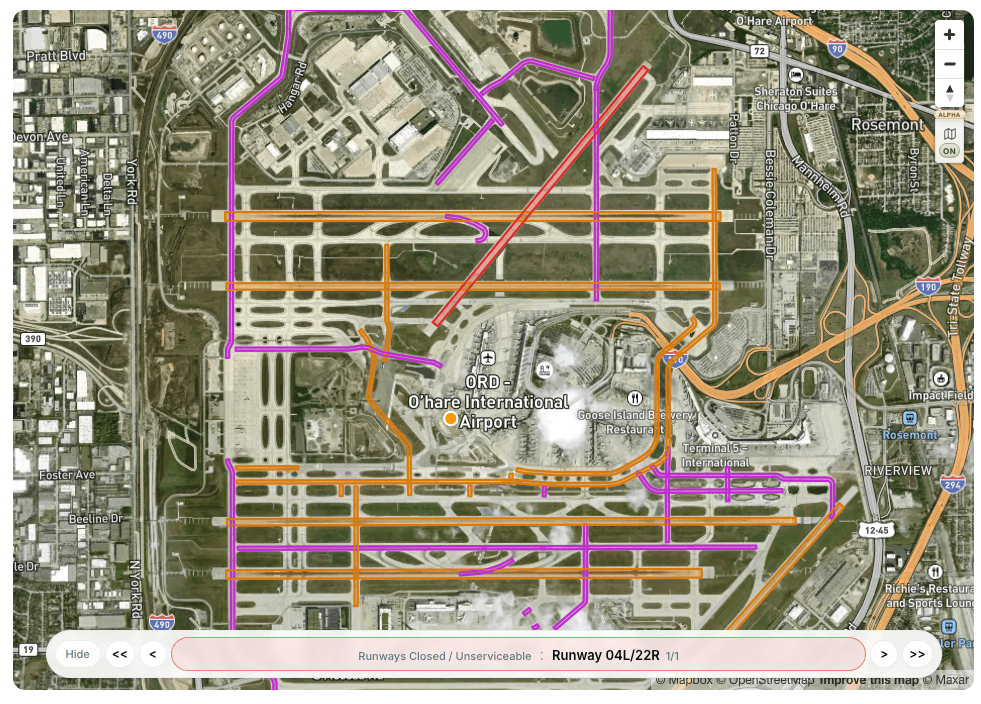
We are releasing a major upgrade to Notam Globe: affected elements for airports, runways, and taxiways are now visualized directly on the globe, with built-in navigation that lets you move through what matters instead of hunting manually through the map.
For teams running many stations, airports are a perfect fit for the Notamify Dashboard. If you need to control closures and restrictions across a network of airports, seeing affected aerodromes directly on the globe makes the dashboard much faster to scan and much easier to act on.
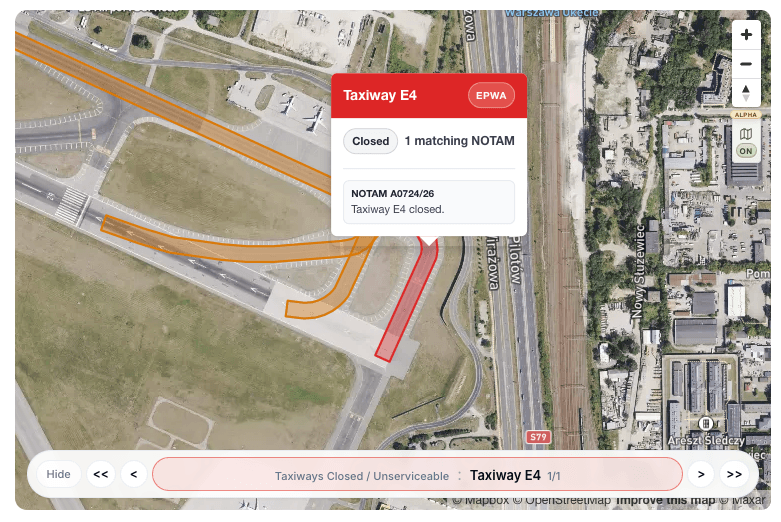
For pilots, runways and taxiways on the globe have been one of the most requested features we have heard about. And honestly, it makes sense. When you are dealing with a dense airport in a real taxiway restriction jungle, reading the raw text is one thing, but understanding what is actually affected is another.
That is really the value of graphical NOTAMs. They do not replace the source text or the official wording, but they give you a fast visual read of what is closed, restricted, or operationally relevant before you start parsing every line. Instead of translating text into a mental map, you can see the impact immediately and then drill into the details with the original NOTAM context still attached.
That is why the new navigation is so important. You can move through affected elements directly from the globe controls:
- Jump between categories like airports, runways, and taxiways
- Step through individual affected elements one by one
- Open the related popup immediately as the globe focuses the selected element
- Dismiss the popup and keep your place in the navigator

We also added an extended globe view, which gives you more room to work with larger airports and denser NOTAM situations.

This is especially useful when you want to inspect a busy field without constantly switching layouts or losing context between the map and the list.
There is one limitation worth calling out clearly. Right now, partial restrictions such as "TWY A BTN TWY T AND TWY CC CLSD" are still handled as restricted rather than as a precise partial closure. That is intentional for now, because we prefer showing a conservative restriction instead of pretending we already have exact segment-level closure logic.
The good news: support for partial closures is already on the way, and it is one of the next improvements we plan to ship in this area.
If you are using Notamify to monitor many airports, this release makes the globe far more operational. And if you are a pilot trying to make sense of dense taxiway restrictions, it should feel a lot less like guesswork and a lot more like navigation.
Try it yourself in Notamify Pro. Open Notam Globe

Read more...
Your AI Agent, Connected to Notamify
10/20/2026
Use Notamify coverage, interpretations and briefings in Codex, ChatGPT and Claude. Connect with your existing account and manage access in Notamify.
Track Starship NOTAMs and Restrictions
9/27/2026
Explore Starship launch restrictions, route closures and re-entry NOTAMs on one map, with notices grouped by airport and flight information region.
Faster Flight Briefings and Automatic Airport Summaries
9/25/2026
Flight briefings now generate 47% faster with improved accuracy. Airport summaries take around few seconds, with a new Auto option for airport pages.
4 Million NOTAMs: What Happens After an Airport Closes
9/12/2026
A review of airport closures, changing airspace restrictions and the information available to flight operations teams in Notamify’s archives.