

TORA, TODA, LDA, ASDA and NOTAMs
5/9/2026
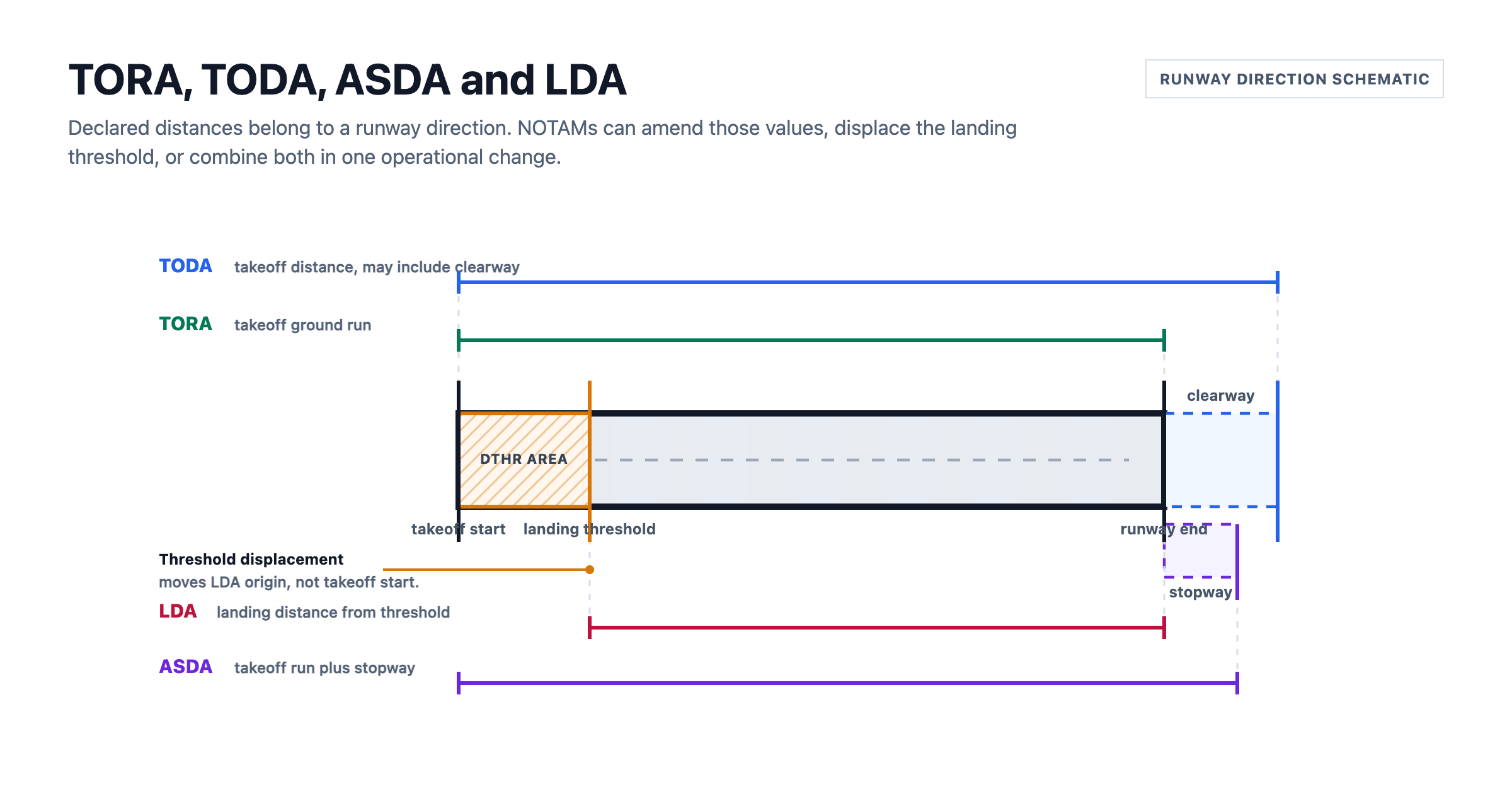
Runway declared distances are some of the most important numbers in airport NOTAMs. They decide how much runway is available for takeoff performance, rejected takeoff performance, and landing performance.
They are also easy to misread in raw text. A single NOTAM can say that a threshold is displaced, then list new TORA, TODA, ASDA and LDA values for both runway directions. If you read that as one generic runway restriction, you miss the operational detail.
That is why Notamify shows declared runway distances and threshold changes as clear operational context in Affected Elements V2 and Notam Globe.
What TORA, TODA, ASDA and LDA mean
The standard declared distances are:
| Distance | Meaning | Operational use |
|---|---|---|
| TORA | Takeoff Run Available | Ground roll distance available for takeoff |
| TODA | Takeoff Distance Available | TORA plus clearway when provided |
| ASDA | Accelerate-Stop Distance Available | Runway plus stopway when provided |
| LDA | Landing Distance Available | Runway length declared available for landing |
The FAA AIM explains declared distances as operational distances that may be more or less than the physical runway length, because clearway, stopway, safety areas, object free areas and protection zones can all affect the declared value. It also states that when declared distances are published, pilots must use those declared distances instead of independently calculating from runway length.
Eurocontrol AIXM guidance uses the same concepts for structured runway declared distances and makes an important point for displacement: LDA is associated with the landing threshold or displaced threshold, while TORA, TODA and ASDA are takeoff distances associated with the takeoff start.
In practical terms:
- TORA, TODA and ASDA are measured from the takeoff start for that runway direction.
- LDA is measured from the landing threshold for that runway direction.
- A displaced threshold affects landing to that threshold, but it does not automatically move the takeoff start.
- A declared distance limit is not the same as a closed piece of pavement.
That last point matters for visualization. Declared distances are performance values. They should be shown as declared-distance markers, not as fake runway closures.
How NOTAMs change runway distances
Runway distance NOTAMs usually come in two forms.
First, a NOTAM may amend the declared distances directly:
RWY 08 TORA 1903M TODA 1963M ASDA 1903M LDA 2156M
RWY 26 TORA 1903M TODA 1963M ASDA 1903M LDA 1820M
Those values are authoritative for the NOTAM. Notamify preserves the published value and unit so meters and feet stay unambiguous.
Second, a NOTAM may move a threshold:
THR RWY 35 DISPLACED 180M
Notamify also distinguishes ordinary threshold displacement from further displacement, because the starting reference is not always the same. That matters when a threshold has already been moved and a later NOTAM moves it again.
Current Notamify view
Affected Elements V2 lets Notamify show runway changes as operational context instead of treating values like 1903M as generic chips in the UI. For a user, that can appear as:
RWY 08: TORA 1903 m, TODA 1963 m, ASDA 1903 m, LDA 2156 m
RWY 26: threshold further displacement 375 m
That lets Notam Globe and the Affected Elements panel show the operational meaning, not just a list of values. Takeoff distances, landing distance, and threshold changes stay visually separate so a displaced threshold does not look like a pavement closure unless the NOTAM actually declares one.
Example: RPUX runway 35 threshold displacement
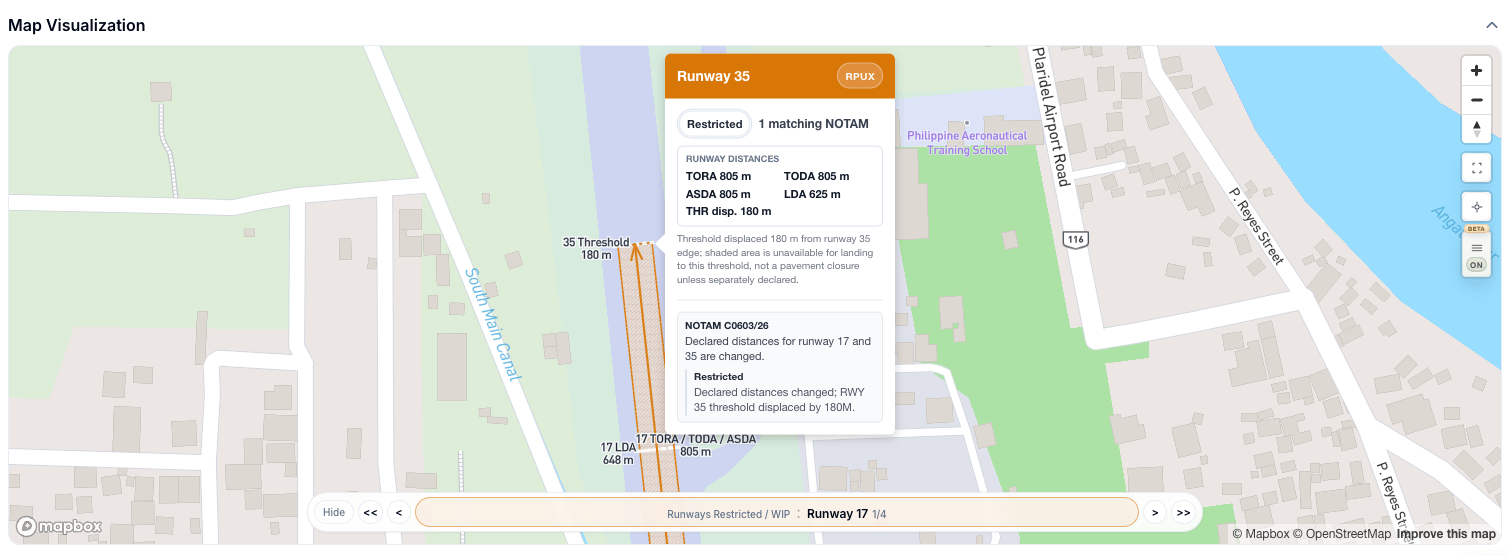
In this RPUX NOTAM, Notamify shows declared distances alongside a displaced threshold.
The important part is that LDA starts at the threshold. In the screenshot, runway 35 has a threshold displacement of 180 m and LDA of 625 m. The threshold marker and the LDA label are not the same concept:
- The threshold marker shows where landing to runway 35 begins.
- The LDA value shows the declared landing distance from that threshold.
- TORA, TODA and ASDA remain takeoff-distance values.
This is exactly the kind of NOTAM that gets messy if the UI only says "runway restricted." The pilot needs to know what changed, which runway direction it applies to, and whether it affects takeoff, landing, or both.
Example: NCRG Rarotonga declared distances
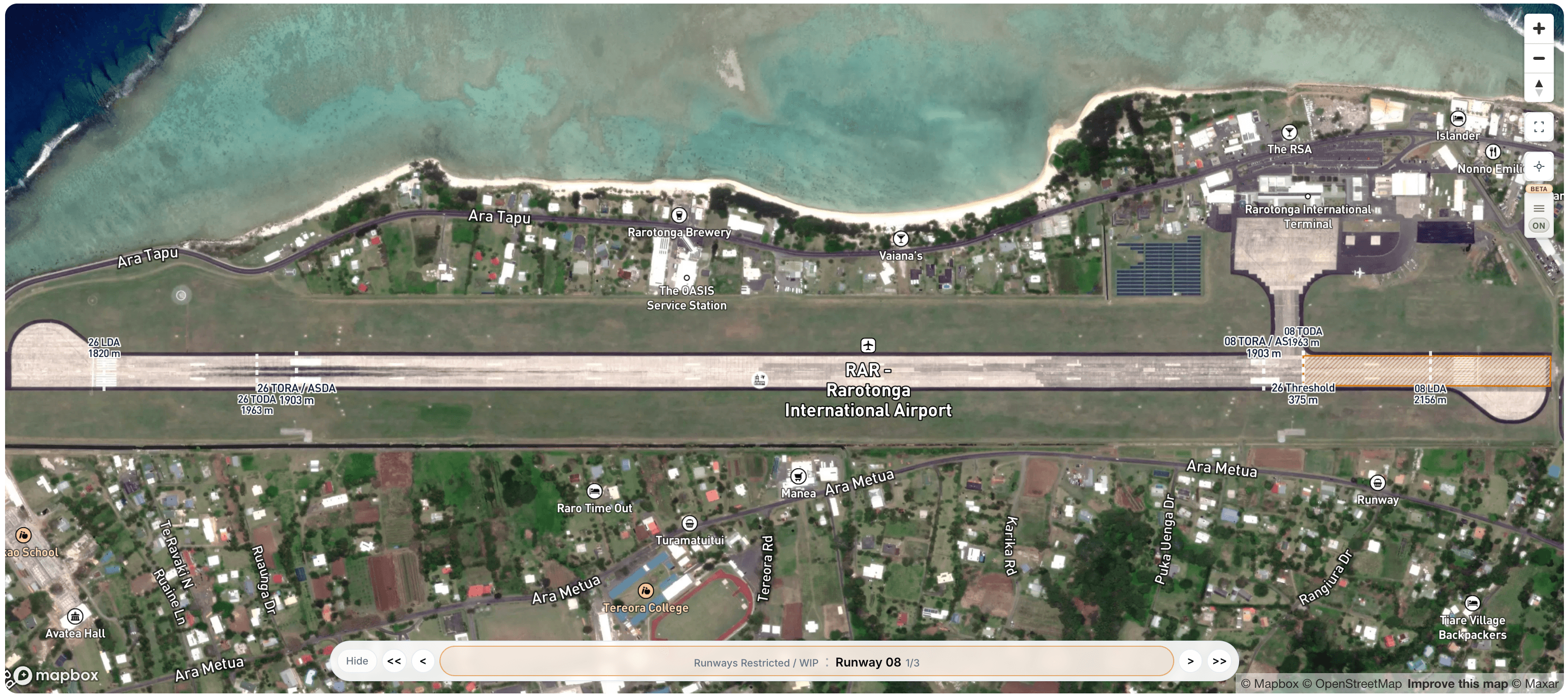
This NCRG NOTAM includes a further displaced threshold for runway 26 and amended declared distances for runway 08 and runway 26:
| Runway | TORA | TODA | ASDA | LDA |
|---|---|---|---|---|
| 08 | 1903 m | 1963 m | 1903 m | 2156 m |
| 26 | 1903 m | 1963 m | 1903 m | 1820 m |
In Notam Globe, the labels stay split by meaning: takeoff distances from the takeoff start, LDA from the landing threshold, and threshold movement as its own change. That separation is the product decision. A displaced threshold, LDA, TORA and ASDA should not look like the same kind of value.
Why Affected Elements V2 matters
Most NOTAM tools still treat this as text. The user sees the raw paragraph, maybe a short AI summary, and has to reason through the runway geometry mentally.
Affected Elements V2 is different because it gives Notamify typed operational structure for runway direction, effect, declared distances, threshold changes, and related conditions. That structure powers the cards, the globe labels, filters, alerts, and API consumers from the same model.
For airport teams, dispatchers, pilots and software teams using the Notamify API, this is where graphical NOTAMs become more than drawing shapes.
This is also one of many Notamify efforts to make operational NOTAM context usable in Skymerse, our Autopilot for Flight Operations.
The practical rule
When a NOTAM declares TORA, TODA, ASDA or LDA, Notamify treats the declared value as the value to show.
When a NOTAM changes a threshold, Notamify treats that as threshold geometry, keeps LDA tied to the resulting landing threshold, and keeps takeoff distances separate from the landing threshold.
This is the level of precision NOTAM interfaces need. Raw text remains the source, but structured Affected Elements V2 makes the operational meaning visible.
Sources

Read more...
Your AI Agent, Connected to Notamify
10/20/2026
Use Notamify coverage, interpretations and briefings in Codex, ChatGPT and Claude. Connect with your existing account and manage access in Notamify.
Track Starship NOTAMs and Restrictions
9/27/2026
Explore Starship launch restrictions, route closures and re-entry NOTAMs on one map, with notices grouped by airport and flight information region.
Faster Flight Briefings and Automatic Airport Summaries
9/25/2026
Flight briefings now generate 47% faster with improved accuracy. Airport summaries take around few seconds, with a new Auto option for airport pages.
4 Million NOTAMs: What Happens After an Airport Closes
9/12/2026
A review of airport closures, changing airspace restrictions and the information available to flight operations teams in Notamify’s archives.