

Notam Globe Product Updates: Partial Taxiways, Geolocation, and Full-Screen Mode
4/3/2026
We have shipped three important upgrades to Notam Globe that make airport-surface NOTAM review much more practical in day-to-day use:
- Partial taxiway support for segment-level closures
- Geolocation so pilots can quickly see where they are on the airport
- Full-screen mode for a cleaner, more focused map workflow
These changes are especially useful at dense airports, where a single taxiway NOTAM can affect only part of a route and where spatial context matters more than raw text alone.
They also build directly on a feature we shipped recently: Notam Globe Gets Affected Elements for Airports, Runways, and Taxiways. That release made graphical NOTAMs much more operational by letting users jump between affected elements on the airport surface. This new update pushes that idea further with more precise taxiway geometry, live geolocation, and a better focused viewing mode.
Partial Taxiways Now Render as Closed Ranges
This is one of the most important improvements we have made to the globe.
Airports frequently issue NOTAMs like:
TWY DD BTN TWY B AND TWY N CLSD
Until now, these kinds of notices were difficult to represent precisely because the closure applies to a range of the taxiway, not the entire surface. Notamify now shows the affected range on the map.
That means a taxiway such as TWY DD can be displayed as closed only between TWY B and TWY N, instead of being treated as a generic or whole-taxiway restriction. This is a major step forward for understanding surface movement constraints at large airports.
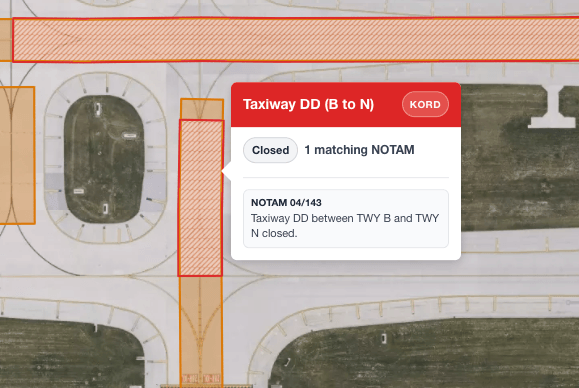
For pilots and dispatchers, the benefit is simple: you can now see exactly which part of the taxiway is unavailable, without mentally reconstructing the restriction from text.
Geolocation on the Airport Map
We also added geolocation to Notam Globe.
This allows pilots to quickly locate themselves on the airport map and compare their current position against nearby closures, restrictions, and affected elements. When you are moving on a complex airfield, that extra orientation can make the globe much faster to work with.
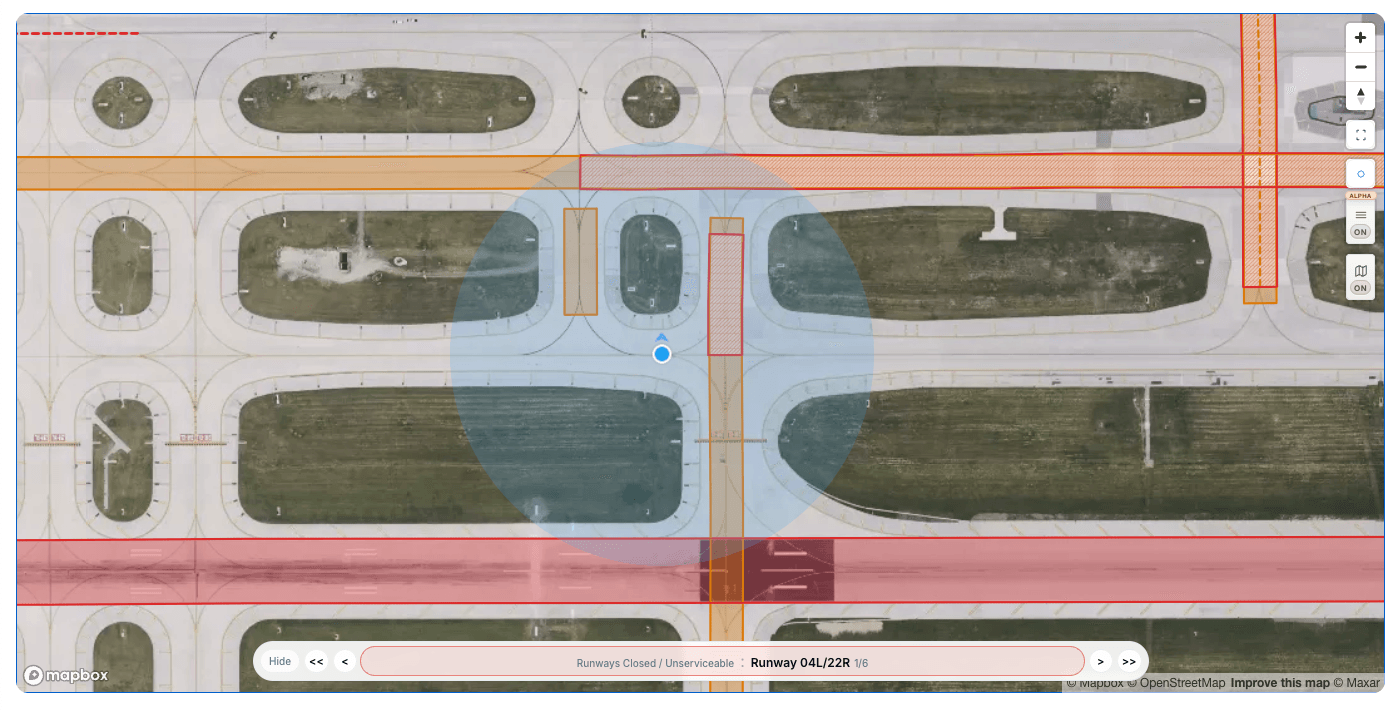
Please note that Notamify is not a certified eFB application.
Full-Screen Mode for Better Focus
The third update is full-screen mode.
When reviewing a dense airport, space matters. Full-screen mode gives the map more room and removes some of the visual competition from the surrounding interface, so you can focus on affected elements and navigation controls.

This works particularly well together with the affected-elements navigation we released recently. You can move through closures and restrictions with a much clearer view of the airport surface.
Why These Updates Matter
Notam Globe is becoming more than a generic spatial viewer. With affected elements, partial taxiway ranges, geolocation, and a focused full-screen workflow, it is moving closer to what pilots and operations teams actually need during airport-surface review:
- precise closure visualization
- faster orientation on the airport
- less time spent translating text into a mental map
We will keep improving this area, especially for airport-surface NOTAMs where small geometry details can have outsized operational impact.
As always, Notamify is an informational tool and must not replace official briefing sources or approved operational systems.

Read more...
Your AI Agent, Connected to Notamify
10/20/2026
Use Notamify coverage, interpretations and briefings in Codex, ChatGPT and Claude. Connect with your existing account and manage access in Notamify.
Track Starship NOTAMs and Restrictions
9/27/2026
Explore Starship launch restrictions, route closures and re-entry NOTAMs on one map, with notices grouped by airport and flight information region.
Faster Flight Briefings and Automatic Airport Summaries
9/25/2026
Flight briefings now generate 47% faster with improved accuracy. Airport summaries take around few seconds, with a new Auto option for airport pages.
4 Million NOTAMs: What Happens After an Airport Closes
9/12/2026
A review of airport closures, changing airspace restrictions and the information available to flight operations teams in Notamify’s archives.